东风草堂博客

公众号:开发者来风

1
https://cloud.tencent.com/developer/article/2215771

p2p server

需要通过stun穿透协议定时与穿透服务通信,即在定时器线程里面发送SStunLogin,再在epoll里面udp接收SStunLoginResponse表示登录成功,同时epoll里面udp需要解析SStunTransfer穿透命令,收到穿透命令后需要回复对方一个字节的包。

一个字节的穿透包不一定能发出去,比如当p2p client发起打洞标记时请求的p2p server port和p2p server外部端口对不上,那打的标记就没用,或者p2p client不是严格意义上的nat 3网络(外部端口会隔段时间变化),或者是nat 4对称型网络,基本打洞不成功。

1
2
3
4
5
6
7
8
9
10
11
12
13
14
15
16
17
18
19
20
21
22
23
24
25
26
27
28
29
30
31
32
33
34
35
36
37
38
39
40
41
42
43
44
45
46
47
48
49
50
51
52
53
54
55
56
57
58
59
60
61
62
63
64
65
66
67
68
69
70
71
72
73
74
75
76
77
78
79
80
81
82
83
84
85
86
87
88
89
90
91
92
93
94
95
96
97
98
99
100
101
102
103
104
105
106
107
108
109
110
111
// 定时器线程:每隔30秒发送STUN登录请求
std::thread timer_thread([&]()
{
while (true) {
static unsigned int s_seq = 0;
int size = sizeof(SStunLogin) + g_strDeviceId.size() - 1;
char* buf = new char[size];
SStunLogin* p = (SStunLogin*)buf;
p->head.len = htons(size);
p->head.cmd = htons(STUN_CMD_LOGIN);
p->head.seq = htonl(++s_seq);
p->nat = g_finalNatType;
memcpy_s(p->uid, size - sizeof(SStunLogin) + 1, g_strDeviceId.c_str(), g_strDeviceId.size());
sendto(sockfd, buf, size, 0, (const sockaddr*)&server_addr, sizeof(server_addr));
delete[] buf;
printf("udp stun alive seq = %u\n", s_seq);
sleep(30);
} });

// 创建epoll
int epoll_fd = epoll_create(1);
if (epoll_fd < 0)
{
std::cerr << "Failed to create epoll" << std::endl;
return 1;
}

// 添加UDP套接字到epoll
struct epoll_event event;
event.events = EPOLLIN;
event.data.fd = sockfd;
if (epoll_ctl(epoll_fd, EPOLL_CTL_ADD, sockfd, &event) < 0)
{
std::cerr << "Failed to add socket to epoll" << std::endl;
return 1;
}

// epoll等待事件
const int MAX_EVENTS = 10;
struct epoll_event events[MAX_EVENTS];
while (true)
{
int num_events = epoll_wait(epoll_fd, events, MAX_EVENTS, -1);
if (num_events < 0)
{
std::cerr << "Error in epoll_wait" << std::endl;
return 1;
}

for (int i = 0; i < num_events; ++i)
{
if (events[i].data.fd == sockfd && events[i].events & EPOLLIN)
{
char buf[1500];
struct sockaddr_in client_addr;
socklen_t addr_len = sizeof(client_addr);
ssize_t num_bytes = recvfrom(sockfd, &buf, sizeof(buf), 0,
(struct sockaddr *)&client_addr, &addr_len);
if (num_bytes < 0)
{
std::cerr << "Error in recvfrom" << std::endl;
continue;
}

printf("recvfrom %s_%d size = %ld\n", inet_ntoa(client_addr.sin_addr), ntohs(client_addr.sin_port), num_bytes);

if (sizeof(SStunLoginResponse) == num_bytes)
{
// 尝试解析成穿透响应
SStunLoginResponse *slr = (SStunLoginResponse *)buf;
if (ntohs(slr->head.cmd) == STUN_CMD_LOGIN && ntohs(slr->head.len) == num_bytes)
{
printf("recv stun alive result = %d,seq = %u,ip = %s,port = %d\n", (int)slr->result, ntohl(slr->head.seq),
IpInt2Str(slr->ip).c_str(), ntohs(slr->port));
}
}
if (sizeof(SStunTransfer) == num_bytes)
{
// 尝试解析成穿透命令
SStunTransfer *st = (SStunTransfer *)buf;
if (ntohs(st->head.cmd) == STUN_CMD_TRANSFER && ntohs(st->head.len) == num_bytes)
{
SStunResponse response;
response.head.cmd = st->head.cmd;
response.head.seq = st->head.seq;
response.head.len = htons(sizeof(response));
response.result = 0;
int tmpRet = sendto(sockfd, (const char *)&response, sizeof(response), 0, (sockaddr *)&client_addr, addr_len);
if (tmpRet != sizeof(response))
{
printf("sendto %s_%d ret = %d,error = %d\n", IpInt2Str(client_addr.sin_addr.s_addr).c_str(), ntohs(client_addr.sin_port), tmpRet,
errno);
}
client_addr.sin_addr.s_addr = st->ip;
client_addr.sin_port = st->port;
tmpRet = sendto(sockfd, "0", 1, 0, (sockaddr *)&client_addr, addr_len);
if (tmpRet != 1)
{
printf("sendto %s_%d ret = %d,error = %d\n", IpInt2Str(client_addr.sin_addr.s_addr).c_str(), ntohs(client_addr.sin_port), tmpRet,
errno);
}
printf("stun to %s_%d\n", IpInt2Str(client_addr.sin_addr.s_addr).c_str(), ntohs(client_addr.sin_port));
}
}
else
{
std::cout << "receive data " << string(buf, num_bytes) << std::endl;
}
}
}
}
阅读全文 »

1
https://www.boost.org/doc/libs/1_71_0/doc/html/boost_asio/reference.html

知识点

1
2
3
4
5
6
7
8
9
10
11
12
13
14
15
16
17
18
# https://sourceforge.net/projects/boost/
# https://www.boost.org/users/history/
#boost 1.60
./bootstrap.sh --prefix=$(pwd)/app --with-libraries=atomic,system,filesystem,chrono,thread,date_time,exception,iostreams
vim project-config.jam
# using gcc : arm64 : /root/wxz_test/sdk_package/toolchain/bin/aarch64-openwrt-linux-musl-g++ ;
./b2 cxxflags="-std=c++0x -fPIC" cflags="-fPIC" -j7
./b2 install
# or
./b2 -a --with-program_options --with-atomic --with-date_time --with-system --with-thread --with-chrono --with-filesystem --with-serialization cxxflags="-std=c++0x -fPIC" cflags="-fPIC" -j7 install

# nm libboost_system.a | c++filt | grep "boost"

# 有的平台使用时,需要加这几个头,否则报错undefined reference to boost::system::system_category()
# 如果编译没有报错,则不要轻易加,会导致boost asio async_connect一直报错Operation already in progress
-DBOOST_ERROR_CODE_HEADER_ONLY -DBOOST_SYSTEM_NO_DEPRECATED -DBOOST_CHRONO_HEADER_ONLY

# /root/wxz_test/sdk_package/toolchain/bin/aarch64-openwrt-linux-g++ boosttest.cpp -o boosttest -std=c++11 -I/root/wxz_test/boost_1_60_0/app/include -L /root/wxz_test/boost_1_60_0/app/lib/ -l:libboost_system.a -l:libboost_thread.a -lpthread

ibevent是基于Reactor(反应器模式)。boost.asio是基于Proactor(主动器模式)。
io_context类似于reactor或iocp,有两个重要的命名空间boost::asio和boost::asio::ip
boost::asio下的io函数有connect、accept、read_some、write_some,异步io加个async即可。
boost::asio::ip主要有ip地址ip::address,端点ip::tcp::endpoint\ip::udp::address,sockect:ip::tcp::socket\ip::udp::socket.
套接字控制:set_option\get_option\io_control

1
2
3
// TCP套接字可以重用地址
ip::tcp::socket::reuse_address ra(true);
sock.set_option(ra);
阅读全文 »

命令记录

1
2
3
4
5
6
7
8
9
10
11
12
13
14
15
16
17
18
19
yum -y install dnsmasq

vim /etc/dnsmasq.conf
resolv-file=/etc/resolv.dnsmasq.conf
strict-order
listen-address=127.0.0.1,10.0.16.15
addn-hosts=/etc/dnsmasq.hosts
conf-dir=/etc/dnsmasq.d,.rpmnew,.rpmsave,.rpmorig

vim /etc/resolv.dnsmasq.conf
nameserver 127.0.0.1
nameserver 114.114.114.114
nameserver 8.8.8.8

vim /etc/dnsmasq.hosts
# 输入你需要解析的ip和域名

service dnsmasq restart
netstat -tlunp|grep 53

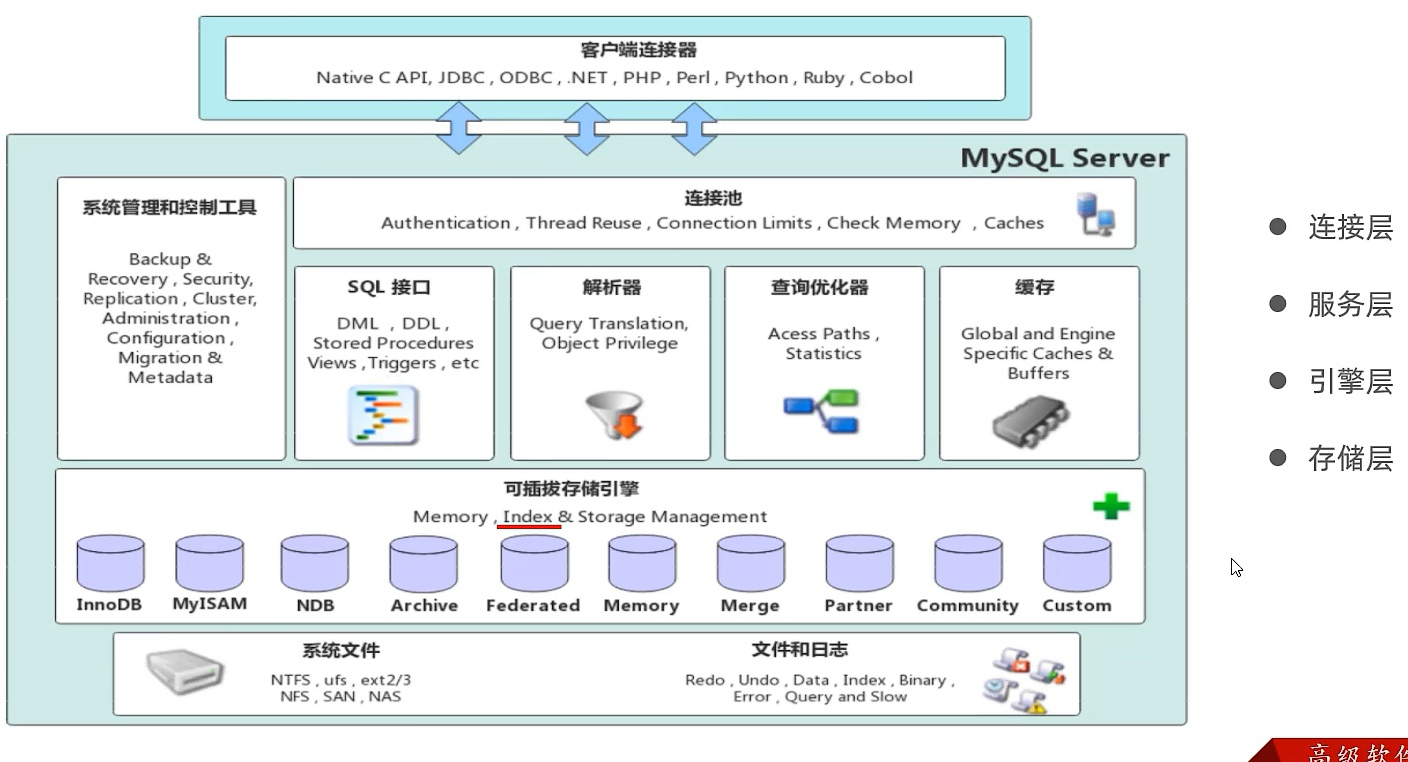
MySQL 体系结构

  • 连接层
    最上层是一些客户端和链接服务,主要完成一些类似于连接处理、授权认证、及相关的安全方案。服务器也会为安全接入的每个客户端验证它所具有的操作权限。
  • 服务层
    第二层架构主要完成大多数的核心服务功能,如 SQL 接口,并完成缓存的查询, SQL 的分析和优化,部分内置函数的执行。所有跨存储引擎的功能也在这一层实现,如过程、函数等。
  • 引擎层
    存储引擎真正的负责了 MySQL 中数据的存储和提取,服务器通过 API 和存储引擎进行通信。不同的存储引擎具有不同的功能,这样我们可以根据自己的需要,来选取合适的存储引擎。
  • 存储层
    主要是将数据存储在文件系统之上,并完成与存储引擎的交互。

show create table account,查看建表语句,engine指定存储引擎。show engins查询支持的引擎。

InnoDB

阅读全文 »


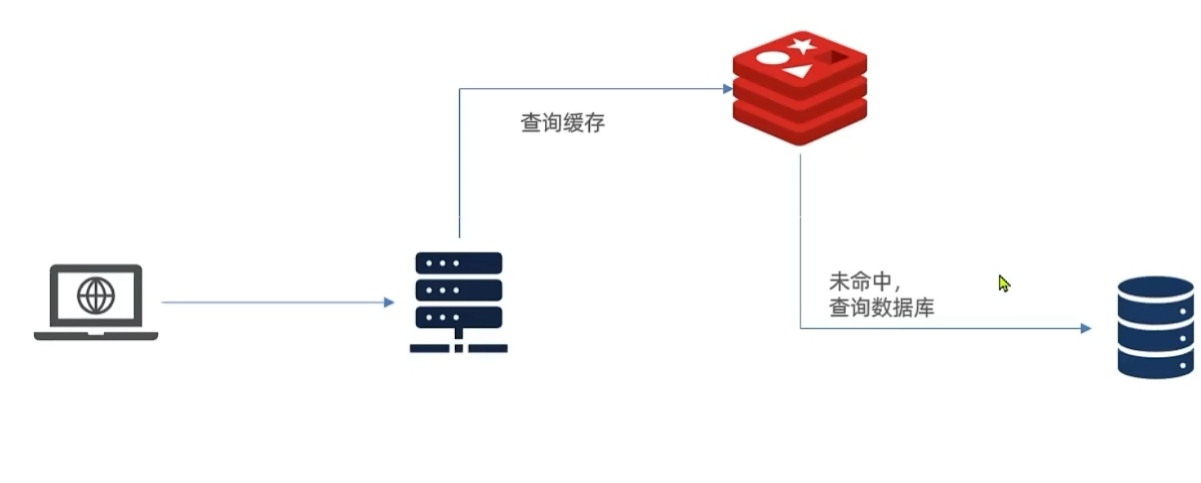
传统的缓存策略一般是请求到达 Tomcat 后,先查询 Redis ,如果未命中则查询数据库,存在下面的问题:

  • 请求要经过 Tomcat 处理, Tomcat 的性能成为整个系统的瓶颈
  • Redis 缓存失效时,会对数据库产生冲击

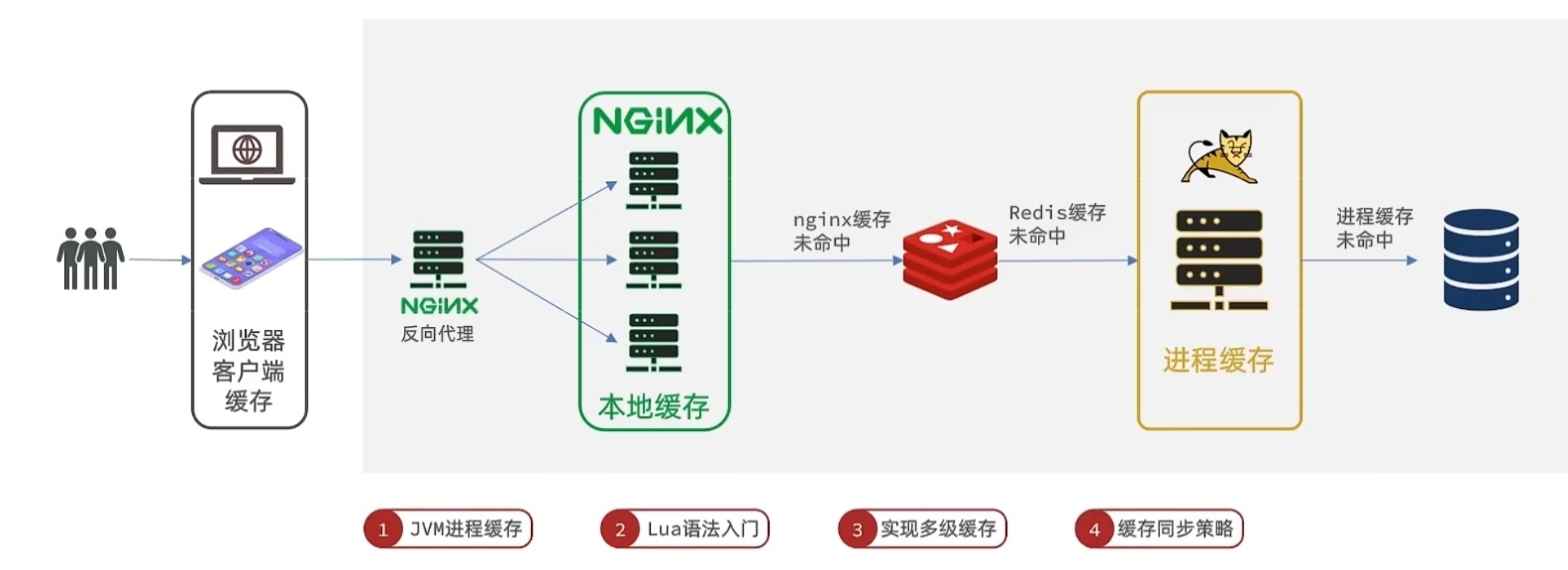
多级缓存方案

用作缓存的 Nginx 是业务 Nginx ,需要部署为集群,再有专门的 Nginx 用来做反向代理(proxy_pass+upstream配置):

缓存在日常开发中启动至关重要的作用,由于是存储在内存中,数据的读取速度是非常快的,能大量减少对数据库的访问,减少数据库的压力。我们把缓存分为两类:

  • 分布式缓存,例如 Redis :
    • 优点:存储容量更大、可靠性更好、可以在集群间共享.缺点:访问缓存有网络开销
    • 场景:缓存数据量较大、可靠性要求较高、需要在集群间共享
  • 进程本地缓存,例如 HashMap 、 GuavaCache :
    • 优点:读取本地内存,没有网络开销,速度更快·缺点:存储容量有限、可靠性较低、无法共享
    • 场景:性能要求较高,缓存数据量较小
阅读全文 »

单点redis问题

  • 数据丢失,实现redis持久化
  • 并发能力,主从集群,读写分离
  • 故障恢复,哨兵机制,健康监测,自动恢复
  • 存储能力,分片集群,插槽机制实现动态扩容

redis持久化

rdb,redis数据备份文件,实现持久化。
save命令开启,主进程阻塞完成。bgsave后台完成。停机时自动执行rdb。
redis.conf可以配置,save 900 1表示900秒内,如果至少一个key被修改,则执行bgsave,如果是save “”,则表示禁用rdb。dbfilename和dir也可以配置文件名和目录,rdbcompression可以配置是否压缩,但会消耗cpu。


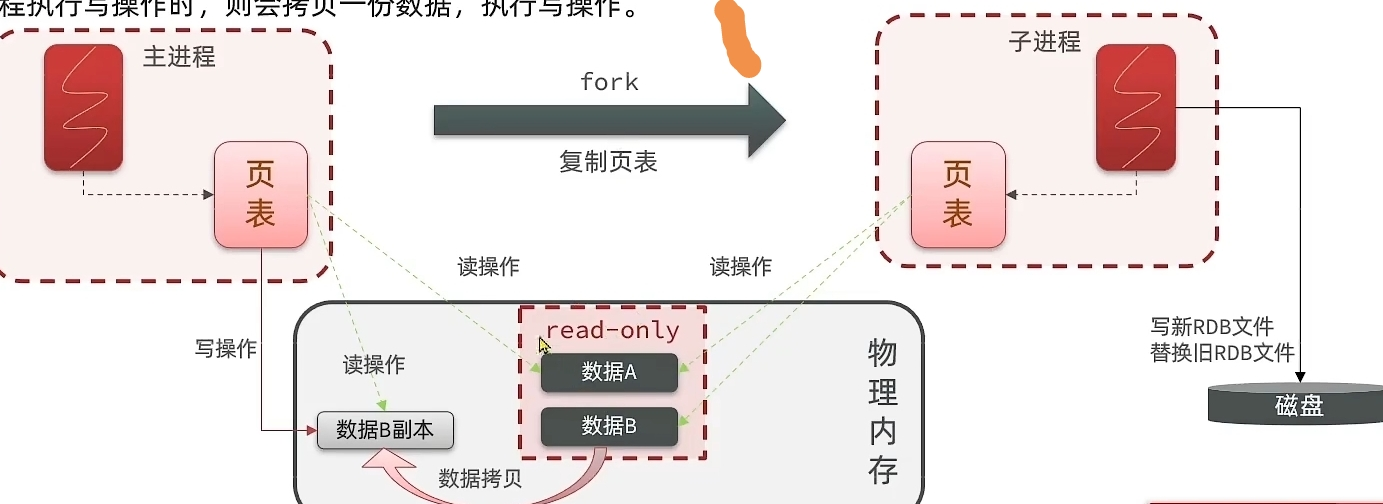
bgsave开始时会fork主进程得到子进程,子进程共享主进程的内存数据,完成fork后读取内存数据写入rgb文件。fork采用copy-on-write技术,读操作访问共享内存,写操作拷贝数据执行写操作,所以极端情况所有数据都被修改了,可能内存会翻倍。

阅读全文 »

在 CentOS 系统上安装 Google Chrome 浏览器,可以按照以下步骤进行:

添加 Google Chrome 的 YUM 源
在终端中输入以下命令:

sudo tee /etc/yum.repos.d/google-chrome.repo <<-‘EOF’
[google-chrome]
name=google-chrome - $basearch
baseurl=http://dl.google.com/linux/chrome/rpm/stable/$basearch
enabled=1
gpgcheck=1
gpgkey=https://dl.google.com/linux/linux_signing_key.pub
EOF
安装 Google Chrome
输入以下命令进行安装:

yum -y install google-chrome-stable –nogpgcheck
启动 Google Chrome
在终端中输入以下命令启动 Google Chrome 浏览器:

google-chrome
这样就可以在 CentOS 系统上安装和使用 Google Chrome 浏览器了,输入法安装:https://www.google.cn/intl/zh-CN/inputtools/chrome/index.html。

阅读全文 »

go server

1
data: something happend!\n\n

第二个 \n 表示这个 event 结束,可以发给客户端了。第一个 \n 主要是为了有时要传输多行数据时,例如传个 json:

1
2
3
data: {\n
data: "foo": "bar"\n
data: }\n\n

上面都属于 message 这个类型,如果想发送别的类型可以通过 event 字段自定义:

阅读全文 »

网络模式

docker的默认网络模式的bridge,有个问题,docker内部无法直接与另外的docker内的端口进行通信,改为host模式即可。如果不改网络模式的话,要么不走http,改为走uds通信就可以。

1
2
3
services:
nginx:
network_mode: "host"

镜像推送

1
2
3
4
docker build . -t REPOSITORY:TAG
docker tag IMAGEID(镜像id) REPOSITORY:TAG(仓库:标签)
docker login
docker push nephen2023/chatgpt-next-web

+——————————————-+
| Server |
| (single-threaded, event-driven etc) |
+——————————————-+
| Processor |
| (compiler generated) |
+——————————————-+
| Protocol |
| (JSON, compact etc) |
+——————————————-+
| Transport |
| (raw TCP, HTTP etc) |
+——————————————-+

Transport

Transport传输层为从网络读取/向网络写入提供了一个简单的抽象。这使 Thrift 能够将底层传输与系统的其余部分分离(例如,序列化/反序列化)
Transport接口:

  • open
  • close
  • read
  • write
  • flush

除了上面的 Transport 接口之外,Thrift 还使用了一个 ServerTransport 接口,用于接受或创建原始传输对象。顾名思义,ServerTransport 主要用于服务器端,为传入连接创建新的传输对象

阅读全文 »
0%